Learn how to set up, optimize, and rank your GBP listing to dominate local search and Google Maps.
If you run a local business, such as a café, law firm, dental practice, or home services company, your Google Business Profile (GBP) is a powerful free tool for your business success. It determines whether customers find you in Google Search, Google Maps, and the coveted Local 3-Pack.
Yet most businesses leave their Google Business Profile incomplete, inconsistent, or completely unoptimized. This guide changes that. You'll get the complete playbook, from first-time setup to advanced optimization strategies that drive real leads and local rankings in 2026.
A Google Business Profile (formerly called Google My Business or GMB) is a free business listing provided by Google that allows businesses to manage how they appear across Google Search and Google Maps. When someone searches for your business name or a service you offer in your area, your Google Business Profile is what shows up in the knowledge panel, the Local 3-Pack, and Google Maps results.
Your GBP listing can include your business name, address, phone number, website, hours of operation, photos, reviews, products, services, Q&A, and regular posts. Think of it as your digital storefront on Google, often the very first impression a potential customer gets of your business.
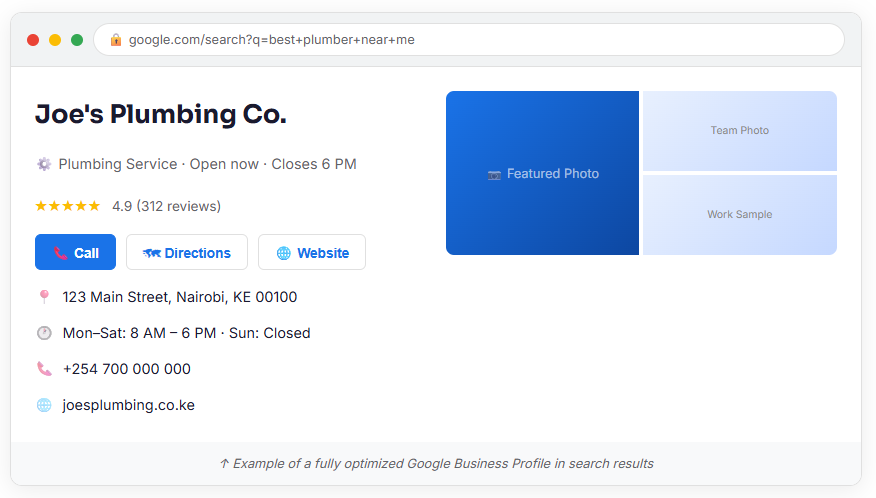
In 2021, Google rebranded Google My Business (GMB) to Google Business Profile and moved most management functionality directly into Google Search and Google Maps. There is no separate GMB app anymore — you manage your profile directly from Google. The core concept remains identical: it's your free, verified local business listing on Google.
Whether it’s fintech marketing or garage marketing, you need a well-optimized GMB.
Your GBP is not just a directory listing; it's a primary ranking signal for local search. According to recent industry data, GBP signals can account for as much as 25–32% of all local pack ranking factors, making it the single most influential lever you have in local SEO.
When users search for services "near me" or with a location modifier, Google displays three businesses prominently before organic results, the Google Local Pack. Getting into that top-3 box drives enormous, high-intent traffic. An optimized Google Business Profile receives between 80 to 300 clicks per month on average, generating calls, direction requests, and website visits.
Here are the key stats that show why this matters:
Beyond rankings, a well-optimized GBP builds trust, captures zero-click searches (Google shows your info without users visiting your site), and directly drives leads. In 2026, with 60% of searches ending as zero-click, being visible in the Local Pack isn't optional, it's your primary lead generation channel.
Setting up a Google Business Profile takes about 15–20 minutes. Here's exactly how to do it:
Step 1: Go to business.google.com
Visit business.google.com and click "Manage now." Sign in with a Google account you want associated with your business, ideally, a business Gmail account.
Step 2: Enter Your Business Name
Type your exact business name. Google will check if a profile already exists. If one does, claim it. If not, click "Create a business with this name." Do not add keywords to your business name. This violates Google's guidelines and can get your listing suspended.
Step 3: Choose Your Business Category
This is one of the most critical steps. Select the most specific primary category that describes your core business. You can add secondary categories later. Your primary category is the single biggest GBP ranking factor according to local SEO research.
Step 4: Add Your Location or Service Area
If customers visit your physical location, enter your address. If you serve customers at their location (like a plumber or cleaning service), select "Service Area" and define the cities or zip codes you serve. Both options can be combined if applicable.
Step 5: Add Contact Details & Website
Enter your phone number and website URL. Make sure these match exactly what appears on your website and other directories — this is called NAP consistency (Name, Address, Phone), and it's critical for local SEO.
Step 6: Verify Your Business
Google requires verification to confirm you're a legitimate business. Verification methods include postcard by mail (most common), phone call, email, video recording, or instant verification for eligible businesses. Your profile won't show in full until verified — so prioritize this step.
Pro Tip: If your verification postcard doesn't arrive within 14 days, request a new one or try an alternate verification method. Don't wait — verification unlocks your full ranking potential.
Verification is just the starting line. Optimization is what drives rankings. Google rewards complete, accurate, and active profiles with better visibility.
Here's what to optimize:
Use your exact, real-world business name. Do not stuff keywords. Google actively penalizes and suspends profiles that add keyword phrases like "Best Plumber NYC" to their business name. Accuracy and consistency build the trust signals that improve rankings over time. Your name builds your entity SEO profile.
Your primary category is the most important selection you'll make. Choose the most specific, relevant option. "Italian Restaurant" beats "Restaurant." You can add up to 9 secondary categories to cover additional services. Audit your categories quarterly, as Google regularly adds new options.
You have 750 characters. Make them count. Write a compelling description that naturally incorporates 2–3 relevant keywords (your services, your city, "Google Business Profile" if relevant), explains what makes your business unique, mentions your service area, and avoids promotional language, links, or HTML. Top-ranking GBP profiles average around 70 words in their descriptions. Add all the important keywords in your description.
Add every service you offer with a name, description (up to 300 characters), and price if applicable. Use natural language that mirrors how customers search — not internal jargon. Google cross-references your Services tab with your website to verify expertise.
Keep hours accurate at all times, including special holiday hours. Outdated hours are one of the top reasons for negative reviews. Google rewards profiles that maintain accurate, up-to-date information.
Attributes are special features you can highlight: "Women-led," "Wheelchair accessible," "Free Wi-Fi," "Outdoor seating," and many others depending on your business type. Fill in every relevant attribute; they improve relevance matching and appear prominently in your listing.
Name, Address, and Phone number must be identical across your Google Business Profile, your website, and every online directory (Yelp, Yellow Pages, Foursquare, industry-specific sites, etc.). Inconsistencies — even minor ones like "St." vs "Street" — signal unreliability and suppress rankings. Run a citation audit at least twice per year.
Google uses three primary factors to rank businesses in local search:
Relevance measures how well your Google Business Profile matches what the user searched for. The more complete and accurate your profile, the better Google can match it to relevant queries. Relevance is primarily influenced by your business category, services, description, and your website content.
Distance measures how far your business is from the searcher's location. This factor cannot be directly optimized — your physical location is your physical location. However, you can expand your effective visibility radius by building stronger Prominence signals.
Prominence measures how well-known and trusted your business is online. This is the factor you have the most control over. It's influenced by review volume and rating, backlinks to your website, online citations, brand search demand, and behavioral engagement signals (clicks, calls, direction requests).
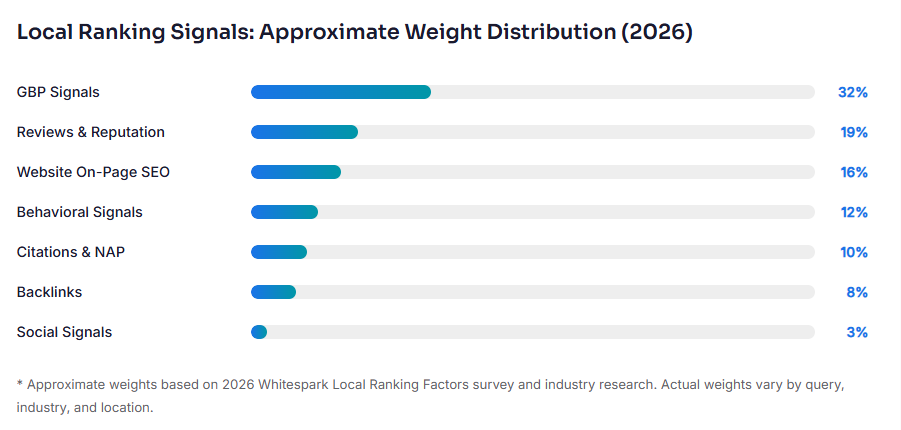
Based on the 2026 Whitespark Local Ranking Factors survey and industry research. Actual weights vary by industry, query, and location.
One of the most significant shifts in recent years is the growing importance of behavioral signals. Google now tracks clicks to your website, phone calls placed, direction requests, photo views, time spent on your profile, and Q&A engagement. Profiles with higher engagement are interpreted as more popular and relevant — which boosts rankings. The best GBP optimization isn't just about filling in fields; it's about creating a profile so compelling that users actively engage with it.
Google reviews are your most powerful and most visible trust signal. They influence ranking through Prominence, build social proof that converts visitors into customers, and directly affect whether your business appears for searches containing "best" or "top," which typically require a minimum 4.0-star rating to trigger.
Key review statistics:
Warning: Never purchase fake reviews or offer incentives in exchange for positive reviews. Google's AI is highly effective at detecting manipulation. Penalties include review removal, listing suspension, and permanent ranking damage.
Responding to reviews — both positive and negative — is a direct ranking signal. Respond to positive reviews by thanking the customer and personalizing your message. Respond to negative reviews calmly, acknowledge the concern, and offer to resolve it offline. Businesses responding to 80% or more of their reviews see measurably improved local search visibility.
Google heavily weights recent reviews. A steady, consistent flow outperforms sporadic bursts. Businesses that receive 1–3 reviews per week consistently will outrank a competitor that gets 50 reviews in one month and then nothing. Build review acquisition into your regular operations.
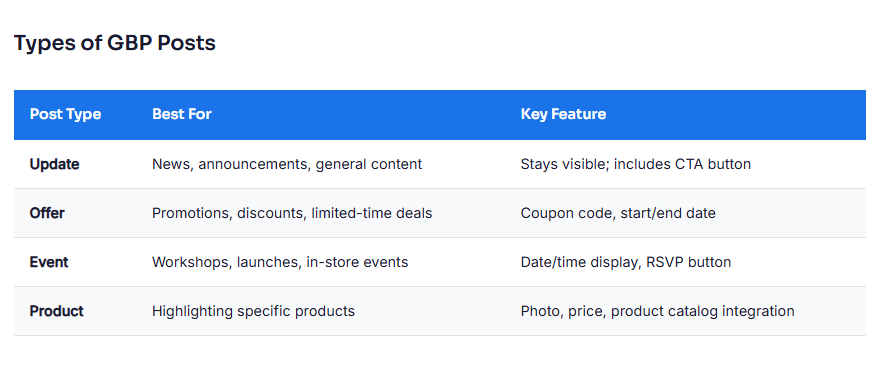
GBP Posts are short updates that appear directly on your Google Business Profile in Search and Maps. Posting at least weekly is linked to measurable improvements in local visibility. Profiles that haven't posted in over 30 days show accelerated visibility decay.
Photos are a high-impact but frequently neglected part of Google Business Profile optimization. Businesses with high-quality, regularly updated photos receive 35% more profile interactions than those with outdated or missing images. Google's Vision AI also "reads" your images to understand your services, meaning relevant photos directly influence relevance matching.
The Local Pack, the three business listings that appear at the top of Google search results for local queries, drives the majority of local search clicks. Here's the complete strategy:
Step 1: Nail Your GBP Foundation
A 100% complete, verified, active GBP with accurate NAP, optimized categories, regular posts, and consistent photo uploads is your baseline. No shortcuts.
Step 2: Build a Strong Review Foundation
Target a minimum of 50+ reviews with a 4.5+ star rating before expecting consistent top-3 rankings for competitive queries. In highly competitive markets, 200+ reviews may be required. Focus on review velocity rather than one-time volume spikes.
Step 3: Optimize Your Website for Local SEO
Google cross-references your GBP with your website. Optimize by creating a dedicated page for each service, including your city/region naturally in page titles and H1s, embedding your Google Map on your contact page, adding LocalBusiness Schema markup, ensuring your site's NAP matches your GBP exactly, and building local backlinks from news sites, chambers of commerce, and partner businesses.
Step 4: Build Citations Across Top Directories
Consistent citations across authoritative directories strengthen Prominence. Priority directories include Yelp, Yellow Pages, Bing Places, Apple Maps, Facebook, TripAdvisor (if applicable), and 10–20 industry-specific directories relevant to your niche.
Step 5: Optimize for Behavioral Signals
Use a compelling cover photo, keep GBP Posts fresh, respond to every Q&A promptly, and seed your own Q&A with common customer questions. Keep your hours and information accurate so users trust and engage with your listing.
Step 6: Earn Brand Searches
When people search your business name directly, it signals real-world demand to Google. Offline advertising, word-of-mouth, and community involvement all build brand search demand. Businesses with growing brand search volume see widening GBP visibility over time.
Google Business Profile Insights (also called "Performance" in your dashboard) gives you free analytics on how customers find and interact with your listing.
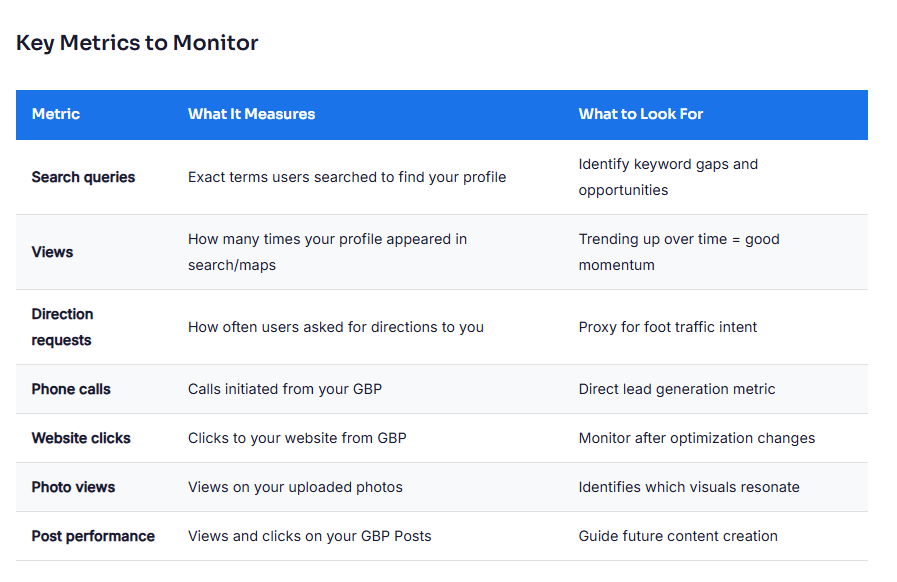
Review your Insights monthly, compare month-over-month trends, and track any spikes or drops alongside the optimization changes you make. This turns your GBP optimization from guesswork into a data-driven system.
These are among the most common reasons businesses struggle to rank in local search. Avoid every one of them:
1. Is Google Business Profile free?
Yes. Google Business Profile is completely free to create and manage. There are no fees to set up, verify, or maintain your listing.
2. How long does it take to rank in the Local Pack?
In low-competition markets, a fully optimized GBP can appear in the Local Pack within 2–4 weeks of verification. In competitive markets, it can take 3–6 months of consistent optimization, review building, and citation work.
3. Can service-area businesses rank without a physical address?
Yes. Service-area businesses (dentists, plumbers, cleaners, landscapers, etc.) can rank in local search without displaying a physical address. You'll need stronger Prominence signals, more reviews, more backlinks, and consistent content, to compensate for the reduced proximity signal.
4. How do I recover a suspended Google Business Profile?
Suspensions typically occur due to policy violations, such as fake reviews, keyword-stuffed names, ineligible business types, or misrepresented addresses. Identify the likely reason, correct the violation, and submit a reinstatement request through the Business Profile Help Center. Attach supporting documentation such as photos of your location, a business license, etc.
5. Does my website affect my Google Business Profile ranking?
Absolutely. Your website is a significant co-ranking signal. Google cross-references your GBP information with your website's content, authority, and local signals. A strong, locally optimized website with matching NAP, LocalBusiness Schema, and location-specific service pages meaningfully improves GBP rankings.
6. How often should I update my Google Business Profile?
Post at least once per week, respond to new reviews within 24–48 hours, and upload new photos at least 2–4 times per month. Review your categories, services, and business information quarterly. Treat your GBP as a living, active channel — not a set-it-and-forget-it listing.
7. What is the difference between Google Business Profile and Google Maps?
Google Maps is the mapping platform and one of the surfaces where your Google Business Profile appears. Your GBP is the underlying business listing that powers how you show up on Google Maps, Google Search, and the Local Pack. Your GBP is what you manage; Google Maps is one of the places it shows up.
Use this to audit your profile today and identify your highest-priority improvements:
BoostSiteSEO builds local SEO strategies for businesses across the USA, Europe, and Kenya. We handle the strategy, the execution, and the reporting , so you can focus on running your business.
Contact us to start building your local search dominance
